DirectLink VPN - SwiftSecure: quick mobile privacy for Android users
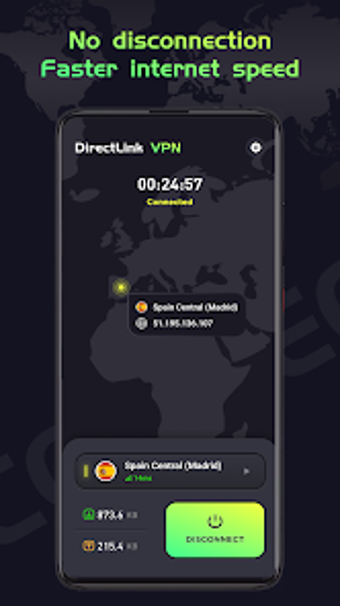
DirectLink VPN - SwiftSecure, from hoopertanner game, protects Android users' internet traffic and privacy on public networks. It establishes an encrypted tunnel that hides the device's IP and routes data through remote servers to prevent interception during browsing and downloads. The app emphasizes high-speed connections and a global server network to access region-locked content. It targets Android users who want immediate, low-configuration privacy while traveling or using hotspots.
How the app handles network-level anonymity
The app creates an encrypted tunnel that conceals the device IP and routes traffic through remote servers, so third parties cannot inspect outgoing or incoming packets. Connection setup appears designed to keep the device's visible address private and present remote endpoints instead of the local address. That model suits users who need basic anonymity during web sessions and want their device address masked when using unknown networks.
How it performs for streaming and gaming sessions
The tool is described as optimized for stable, high-speed connections suitable for streaming, gaming, and large downloads. That optimization implies routing and server selection aim to reduce added latency and preserve throughput for data-intensive tasks. Practical use cases include video playback and online games where maintaining bandwidth is critical; users should pick nearby servers from the global pool to reduce round-trip time.
Is it safe to use on public Wi-Fi?
The app includes automatic threat detection that identifies insecure networks and suggests protective measures, a feature aimed at hotspot scenarios. It secures data flows when connected to open Wi‑Fi and avoids requiring an account, which allows immediate operation without sign-up. Those two facts make it suitable for quick protection on untrusted networks, provided users accept a minimal, account-free model.
Does it require technical knowledge to operate correctly?
Zero-configuration setup and a clear connection-management interface reduce the need for advanced setup steps. The developer positioned the tool for instant use, so everyday mobile users can connect without selecting protocols or tweaking routes. Power users who want granular control over tunneling protocols or manual routing may find the app's simplicity limiting, while casual users gain fast access with little learning.
A practical choice for casual privacy needs, with a single usage caveat
DirectLink suits Android users who prioritize fast, low-friction privacy when using public networks or accessing region-restricted content. Its design favors instant protection and minimal setup, which benefits non-technical users. Advanced users seeking detailed protocol control or extensive configuration options may need a different tool. Practical tip: enable the app before joining any public hotspot to ensure traffic is routed through its servers. Recommended.